Grams, not calories
The gap between calories in and calories out is what moves body weight over time. But if the priority is keeping muscle on rather than moving a number on a scale, , and resistance training is what makes it matter.
BDYWRK is an iOS app built around those exact mechanics. The last post was about the training half, counting push-ups off the front camera and the two rebuilds it took to stop counting shadows. This one includes the eating half, where an on-device LLM handles nutrition, weekly recaps, and other insights. Type "Chipotle burrito bowl with chicken" and about 50g of protein lands in Apple Health a second later. What you type never leaves the phone.
Tracking one macro instead of four looks like a limited feature. But dropping calories, carbs, and fat makes open-ended text logging far faster and less tedious. The app just takes whatever rough description you give it and turns it into an estimate.
Behind that feature sits a strategy narrow enough to run on a phone, a base model that had to carry more than one job, and one number I had to take back.
On-Device Protein Tracking
Log Protein
Estimates are approximate.
- Type a foodDescribe what you ate in plain English, like "apple" or "8oz chicken breast."
- Get an estimateThe on-device model estimates the protein in grams, right on your phone.
- Adjust the gramsNudge the estimate up or down with the plus and minus buttons until it looks right.
- Save to log itPress Save to log the protein to your day. Nothing is logged until you do.
Part I: One forgiving number
Estimating nutrition from a few words has an obvious problem: the words under-specify the meal. "Two eggs and a bowl of oats" might be cooked in butter or dry, a generous bowl or a precisely measured one, and . The calorie answer swings by hundreds on details nobody types. The protein answer barely moves: cook them however you like, two eggs and a bowl of oats lands near 18 grams.
Protein is forgiving in exactly the way calories are not. Preparation mostly changes fat, and fat changes calories; protein rides along largely untouched. Portion guesses still hurt, but they hurt proportionally rather than catastrophically. An estimate off by three grams still tells you what you need to know. An estimate off by 250 calories, repeated for of bodyweight. That is a different feature, with a different engineering budget.
So the feature only asks the narrower question a short description can answer.
The version I'm not building (yet?)
I know what the traditional view of this macro tracking problem is, because I sketched it before deciding against it: license or scrape food databases, index every entry, add embeddings, and maybe a so each estimate is grounded in a record instead of the model's judgment. Building it would take weeks, and it would trade a forgiving on-device feature for a server, a maintenance loop for tracking new entries and defining them for future use, and a much higher bar for being right.
There is also a humility argument. Apps already exist and are already popular, have a big head start, and employ actual database teams (see apps like MyF!tn3ssP@l and Cr@n@m3t3r). I am not trying to out-database them, and I do not need to, because the database was never the annoying part. The annoying part is the logging: the search, finding the right one of forty entries, the serving size, the confirmation. Every food, every meal, every day.
So BDYWRK optimizes for that one macro and that one pain point. You open the app and type what you ate, however specific. About a second later a reasonable estimate of the grams lands in Apple Health. The model runs entirely , so it works in airplane mode, and keeps your food diary on your phone. The estimate does not have to be perfect. It has to be good, instant, offline, and effortless.
Text is for estimating. If you already know the exact macros, querying an LLM is overkill. Just type the number into the field: the app recognizes the digits and logs them instantly without invoking the model. You can also use the Apple Watch complication for direct-entry logging by dialing the crown.
Log Protein
Duct tape and free tiers
This feature started in 2022 as an Apple Shortcut held together by the OpenAI API (viz. text-davinci-003).
The Shortcut was simple: it asked what I ate, sent the sentence to a model with strict instructions to return a bare number of grams, and logged that number directly to Apple Health. I built it in about an hour, and it worked well enough that it became a daily habit.
Of course, daily use is exactly how you discover that free API credits are not a renewable resource.
When the OpenAI credits ran out and I was paying for the feature myself, I rebuilt the Shortcut against Anthropic's API, then against Google's.
Somewhere in that third rebuild, I stopped tracking protein and tabled the idea.
But the API tour settled something: all three providers' models had been good enough that I rarely caught the estimate being unusably wrong.
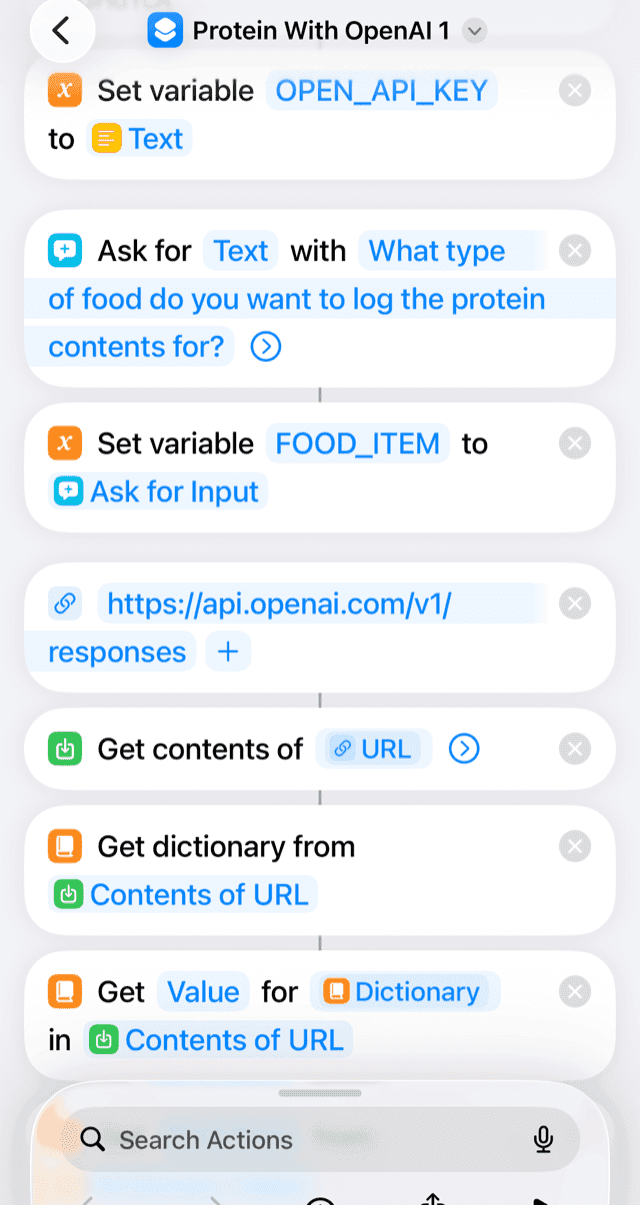
The retired Shortcut: a canned prompt in your pocket
Below is the Shortcut for anyone who wants the duct-taped version. It changed from its first version but still works: it needs an OpenAI API key and about ten minutes in the Shortcuts app. It's also a reasonable skeleton for any pre-canned prompt you want to fire off from your phone without opening a chat app.
First: an OpenAI account with billing enabled, and a key from platform.openai.com → API keys → Create new secret key. It is shown once, so paste it somewhere before you leave the page.
Then: in Shortcuts tap +, rename it Log Protein, and add these in order.
| # | Action | Configure |
|---|---|---|
| 1 | Text | Paste your API key |
| 2 | Set Variable | OPEN_API_KEY, input Text |
| 3 | Ask for Input | Type Text, prompt What type of food do you want to log the protein contents for? |
| 4 | Set Variable | FOOD_ITEM, input Ask for Input |
| 5 | URL | https://api.openai.com/v1/responses |
| 6 | Get Contents of URL | Expand with ➤. Method POST.Headers, exactly one space after Bearer:Authorization → Bearer <OPEN_API_KEY>Content-Type → application/jsonRequest Body JSON, two text fields: model → gpt-4o-miniinput → How many grams of protein are in the following food? Reply with only a number and nothing else, no units, no explanation: then your FOOD_ITEM variable |
| 7 | Six actions, this exact order | Get Dictionary from Contents of URL → Get Value for output → Get First Item → Get Value for content → Get First Item → Get Value for text |
| 8 | Get Numbers from Input | The text value from step 7 |
| 9 | Set Variable | protein_grams |
| 10 | Log Health Sample | Type Protein, value protein_grams, unit g, date blank |
| 11 | Find Health Samples | Type Protein, start date today, unit g |
| 12 | Calculate Statistics | Sum |
| 13 | Show Notification | You've consumed a total of Sum grams of protein today. |
| ▶ | Test it | Tap ▶, allow Health and network access, and try 6 oz grilled chicken breast |
Each run costs a fraction of a cent, but billing has to be active. The key sits in plain text inside the shortcut, so do not share the file (aka use at your own risk!)
Part II: Building it
If you jumped straight here, the setup is one paragraph. The app estimates the protein in a typed food description, the model runs on the phone, and everything language-related has to fit in a small on-device model. The rest of this post is how that model got good enough to ship.
Even if you never download the app, four lessons here are worth your time:
The wrong tokens: A first fine-tune that missed by 10.43 grams because I graded the wrong output.
The leaked test set: A held-out set that shared 68.7% of its foods with training.
The rule written first: A bar set before the bake-off, which cut a candidate that scored fine on protein and hallucinated in 60% of its sentences on a different AI feature.
The bad rubric: A base model that scored 95% against my own rules and was rejected almost every time by the one that ships.
The model that guessed the average
A generative model that fits on a phone is tiny: a few hundred million , thousands of times smaller than the ones behind ChatGPT or Claude. These small models know approximately nothing about food, which is fine. The model did not need to know food in general; it needed to do one narrow thing well, and teaching a small model one narrow thing is exactly what fine-tuning is for.
The first fine-tuning run came back with a of 10.43 grams. The target was 4, a number I wrote into the plan before I had any results to argue with. The average miss was larger than the entire protein content of most foods in the set. Worse than the error itself was the pattern: chicken breast, apple, glass of water, all returned roughly 10 grams. The model was not estimating anything. It had learned the average answer in my training data and was returning it no matter what I typed.
The model learned exactly what I graded, and I had graded everything. Each training example is about ninety tokens of instructions and chat markers wrapped around a one-token answer, and the loss was scored across the whole thing. Reproducing the boilerplate paid better than getting the number right.
The fix is standard practice I had simply not applied: . Regrading only the number took the error from 10.43 to 4.18 grams. No new data, no bigger model, just a fix to what the training run pays attention to.
The next problem was dataset skew. Standard food databases lean heavily low-protein, which caused the model to systematically guess low. That strategy works for a raw database, but fails for actual meals.
Fixing it meant sorting rows into four protein bands and drawing evenly from each, which caps the whole set at whatever the thinnest band holds. High-protein rows were the scarce ones, so I generated them: the same food repeated across a range of portions, because a large serving of chicken breast is where a high-protein label comes from. That filled the thin band and more than doubled the training set. Giving high-protein meals equal weight dropped the error to 2.43 grams, well under target.
An adapter, not a fork
While the model worked, its architecture presented a dead end. It was a standalone copy with baked in weights capable of estimating protein and absolutely nothing else. I already had a second feature lined up for local . This feature was a Weekly Recap that generates a plain language summary of your week. There were also several more ideas sketched out behind it. Shipping a massive model for every single feature was a guaranteed way to build an app with bloat and bad performance.
So the last rebuild changed the shape of the output. I moved to a smaller , and the fine-tune stopped being a fork of the model and became a detachable that toggles on per feature.
A smaller parameter count did not make a smaller file. Most of what the new base weighed was not reasoning capacity but its : 41% of the file I exported is one 151,936-row table plus a duplicate of it the converter writes even though the two are tied, all of it spent telling words apart for a task whose entire output alphabet is the digits 0 to 9. No amount of fine-tuning touches that, which is what sent me looking at other bases later.
The error on my held-out test landed at 2.02 grams. A smaller base, a better number, and one base I could reuse.
68.7 percent: how much of the test set the model had already seen
I believed the 2.02 until I took a deeper look. The test set was the ordinary way: keep a slice of the data away from training, grade against it at the end. The catch is that food data comes in families, and I had spent the previous fix making those families bigger. Every food I had fanned out across portions and phrasings was one food wearing a dozen faces. Splitting by row instead of by family sent some faces into training and the rest into the test set. When I checked, 68.7% of the test items were variations of foods the model had already trained on.
By boosting the number of food items that got me to 2.43 didn't actually improve the model, but instead it just compromised the test set.
There is a name for this, , and I had baked it directly into my data split. A model can score well on a leaky test two ways: by learning the task, or by its homework. The score cannot tell you which one you have.
So I rebuilt the dataset with the fix and more data and reran everything. It now runs to 512,000 rows across 209,000 distinct foods, divided with a : a food and every variant of it lands entirely in training or entirely in the test set. The model gets graded the way a user grades it, on food it has never seen in any form.
The honest number for the shipped model is 3.34 grams. Worse than 2.02, but the march down was real: every (correctly applied) fix improved the model.
One Model, Multiple Jobs
I was picking a base model, and I wanted it to power not just protein tracking, but other AI driven features: the Weekly Recap. From offline testing I saw that larger models could easily handle the recap directly from raw figures and required zero fine-tuning, but their size made them impractical to run locally. Because a single compact model would need to serve both tasks, I set a strict rule before testing: to even be considered, a model had to write a clean sentence for the Recap feature without breaking.
I tested four compact, open-weight models on identical data. One model nailed protein accuracy but catastrophically failed the recap—when handed a brief with zero figures, it hallucinated a day-by-day breakdown full of made-up numbers. Another failed on pure accuracy. The remaining two cleared the initial bar, with the winner acing protein estimation and running efficiently on a heavily build.
The rubric that lied
Moving to the smaller model made protein estimation improvements, but keeping the Weekly Recap functional required heavy compromises. Unlike the larger models, the smaller base couldn't be trusted to infer or place numbers accurately on its own. I had to rewrite the generation rules and tweak the prompt structure so factual figures were moved around entirely outside the LLM—forcing the app to manage the data so the model didn't have to infer numbers at all.
Even with those prompt tweaks, the rubric I used during the bake-off lied. The base scored 95% against the few faults I had initially thought to test, but real-world validation told a different story. So I made a deterministic validator to reject outputs for edge cases my rubric never checked, including: tone wandering, writing in the first person ("I"), or spelling out digits as words.
Across 768 generations through the validator, the bare smaller base passed only 27.2% of the time. While a large model seemed to handle this out of the box, getting this compact model to cross the finish line required some compromise and required fine-tuning another adapter that brought the pass rate to 100%, which shows that the smaller models demand far more engineering discipline to reach production readiness.
Where it stands
This isn't the finished version, and the model still has clear blind spots. Errors scale with complexity: large or multi-component meals miss by more grams than simple snacks. Because it evaluates entire prompts in a single pass, performance degrades when handed complex dishes or an entire day’s worth of food at once. Training data is also far tidier than real life, and messy inputs like "maybe half the box of leftover pad thai" push real-world error past the 3.34-gram benchmark.
Most of these are data limitations rather than architecture flaws, driven by a gap in variety rather than volume. The training set needs rows that mirror how people actually type, along with multi-dish entries instead of isolated foods. A vague prompt will always yield a noisy guess, but tracking only protein keeps that estimate inside a useful margin.
The real win here is the foundation: an evaluation framework I can trust and a validator that enforces strict production rules. As more AI-backed features land in the app, the underlying models are just replaceable parts.
The transferable part
Three times, the number I was watching was not measuring the thing I cared about. Loss was scored across the boilerplate as well as the answer, so the model optimized the wrong tokens and settled on 10.43 grams for everything. The leaked test set was split by row rather than by food family, so the 2.02g result measured memory. The bad rubric scored 95% against the three faults I had thought of, while the deterministic gate that actually ships passed the same model 27.2% of the time. Different bugs, same root cause: I built every harness myself, and every harness told me what I wanted to hear. I knew I had taken shortcuts building quickly, but what surprised me was how predictable the shortcuts were once I went back looking for them. The loss function was the first place I cut a corner. The data split was the second. The rubric was the third. In each case, the fix was hiding in the part I had treated as "good enough" in order to build fast.
A metric you build yourself can quietly measure your assumptions as much as the thing you intended to measure. I closed the last post saying an evaluation has to evolve alongside the thing it grades, which turns out to be much easier to write than to practice. The useful checks were the ones that made it harder to negotiate with the result: write the rule before seeing the scores; split by food family, especially after generating variants; grade through the path the output actually takes in the app. And when I needed to know whether the adapter was doing anything at all, I did not need another benchmark. I turned it off, and the base answered zero for everything. That is the same move as pointing a rep counter at an empty room: test the case where the answer should be nothing.
That is probably the part I will carry into the next model, and the next feature: make the evaluation harder to fool than the thing it is evaluating.
A privacy note: the protein estimate runs entirely on the phone. What you type is read by the on-device model and goes no further, and the grams land in Apple Health on the same device. See the Privacy page for more information.
BDYWRK counts push-ups, pull-ups, sit-ups, squats, and more, using your iPhone's sensors, with everything running on-device. Get BDYWRK now, exclusively on the App Store.